
Description
RETRO PALETTE STUDIO
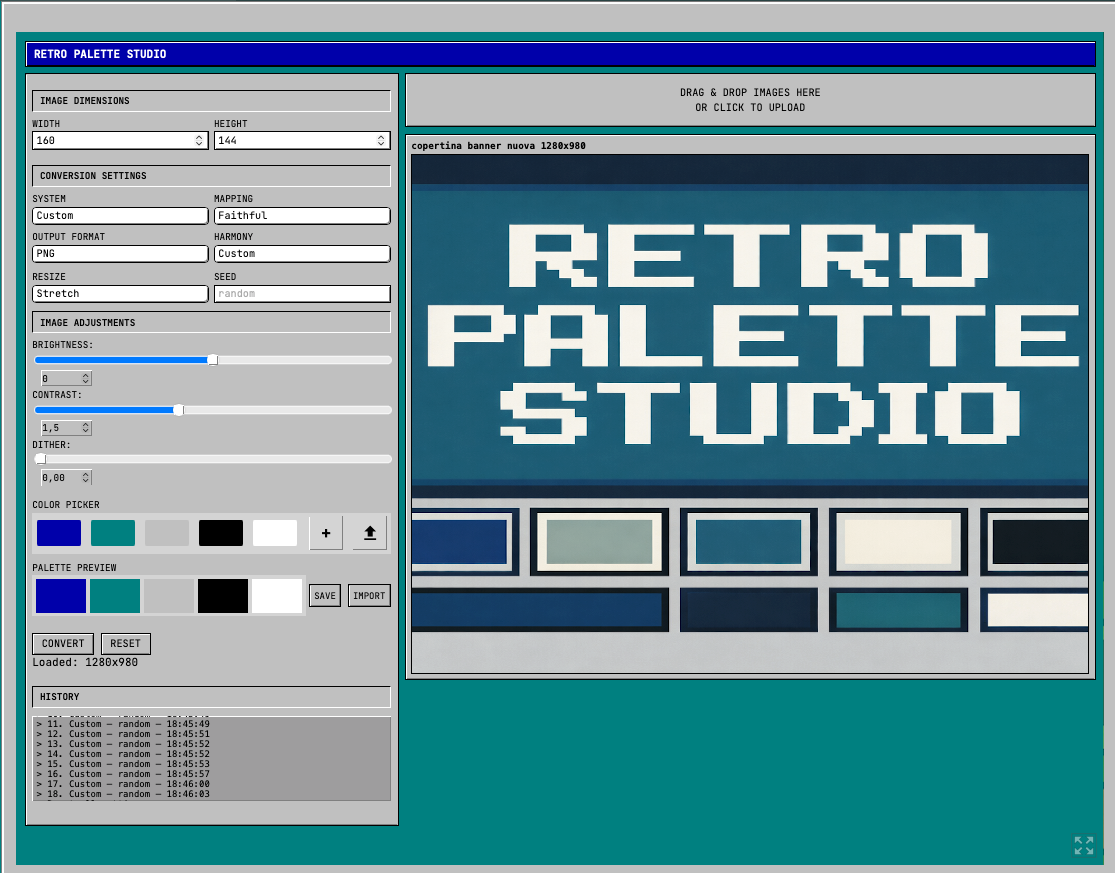
RETRO PALETTE STUDIO is a browser-based advanced image converter with image resizer, palettes, and color-harmony generator, with retro hardware presets. It is designed for pixel artists, game developers, modders, and retro-hardware lovers.
Convert your images into authentic retro palettes (Game Boy, Game Boy Color, NES, SNES, C64…), generate color harmonies, build your own palettes, adjust brightness, contrast, and dither, and export everything instantly.
No installation. No accounts. No tracking. Just pure pixel work.
FEATURES
• Hardware Palettes
Accurate palettes for Game Boy, Game Boy Color, NES, SNES, C64, and more.
• Custom & Harmony Palettes
Custom mode allows to create palettes from a chosen color using the color theory for Analogous, Monochromatic, Complementary, Triadic, Saturation, 60–30–10, and Random with Chaos Level palette creation, or choose the Custom 5-swatch palette that lets you add your own favorite colors.
• Live Preview
Click on the Convert button to apply your settings: palette, adjustments, size, and dithering.
• Image Adjustments
Brightness, contrast, dither (0–100), stretch/fill/original proportions, resize as you wish.
• Perfect for Game Boy projects and other retro platforms
Includes 160×144 mode, 1-bit BMP conversion for Game Boy Pocket/printers/e-ink mods, and other retro presets.
• Batch Conversion
Drag & drop multiple images and convert everything at once.
• Supports Multiple Formats
Upload any of the following formats: JPG, PNG, BMP, SVG. Export your images in JPG, PNG, BMP, SVG, and PDF formats.
• Palette Export
Save palettes in JSON format, ready for Aseprite, GB Studio, Godot, Unity, or your own engine.
• Click to Undo
Click on the History box to restore the settings, or click the Reset button to start from scratch.
• Works entirely offline once loaded
The whole tool runs client-side.
WHO IS THIS FOR
• Pixel artists
• GB Studio developers
• ROM modders
• Graphic designers
• Hobbyists restoring retro photos
• Anyone who wants consistent & aesthetic palettes
WHY IT’S FREE
This tool was built out of passion for retro tech and color science.
If it helps you in your games, art, cartridges, ROM hacks, or videos, you can support the project using the Support This Tool button.
No pressure — but every donation helps develop future features and support our work.
FUTURE UPDATES
We are always working on improving our tools and software. These are some of the features on our wishlist:
• Video–to–retro-palette converter
• Multi-palette layering (hybrids)
• LUT export (.cube)
• User presets, also downloadable
• Standalone downloadable version for desktop computers and mobile devices
• You name it! Suggest new features in the comments


Reviews
There are no reviews yet